BitAim APK Download
Improve your carrom skills with smart guidance for shot angles, direction, power and precision in a simple, user-friendly training experience.
Verify device compatibility and review app permissions before installation.
Smart Guidance
Get useful shot recommendations tailored to your current carrom move.
Angle Support
Learn the right direction and striking angles for more accurate carrom shots.
Power Control
Practice adjusting your shot power for better control and accuracy.
Precision Practice
Build better focus, sharpen your aim and develop consistent carrom skills.
BitAim PAK Version Details
| Feature | Details |
| App Name | BitAim APK (BitAim Official) |
| Category | Game Assistant / Educational Tool |
| Latest Version | v10.7.4 (Latest Update) |
| File Size | ~21 MB |
| Required Android Version | Android 7.0 (Nougat) and up |
| License | Free / Premium Features Available |
| Official Source | BitAimapk.site |
What is BitAim?
Are you looking to level up your Carrom game? You are in the right place. Carrom is all about accuracy, angle, and shot power. Judging these elements by eye can take years of practice. That is where modern technology helps you out.
The BitAim APK gives you digital assistance right on your screen. It works like a virtual coach that analyzes your board in real time. It helps you make the right choices for every single shot. Whether you are a beginner or a seasoned player, this smart guidance tool changes how you practice. You can download the latest working version directly at BitAimapk.site.
What is BitAim APK?
BitAim APK Overview
BitAim APK is a digital assistant designed for digital carrom players. It relies on artificial intelligence to inspect your board setup. It gives you clear shot guidance right when you need it. Think of it as a virtual training partner. It takes the guesswork out of tricky bank shots and complex angles.
How Does BitAim AI Carrom Assistance Work?
The app uses real-time visual AI technology. It takes a screen capture or live view of your carrom board. Then, it identifies the carrom coins, the striker, and the pockets. It computes the angles and projects a line on your screen. This line shows you the exact path your striker and target coin will take.
Key Features of BitAim APK
AI-Powered Carrom Assistance
The core AI system processes visual data instantly. It evaluates coin positions and recommends high-probability moves for your current board layout.
Smart Shot Guidance
You do not have to guess how to hit indirect shots anymore. The app shows line overlays for direct shots, bounce shots, and multi-coin collisions.
Carrom Board and Coin Detection
The visual processing tool automatically identifies white coins, black coins, the queen, and the striker. It maps their positions accurately across the board.
Striker Position Analysis
BitAim looks at where your striker sits on the baseline. It helps you find the most suitable striking angles based on your starting spot.
Angle Detection and Calculation
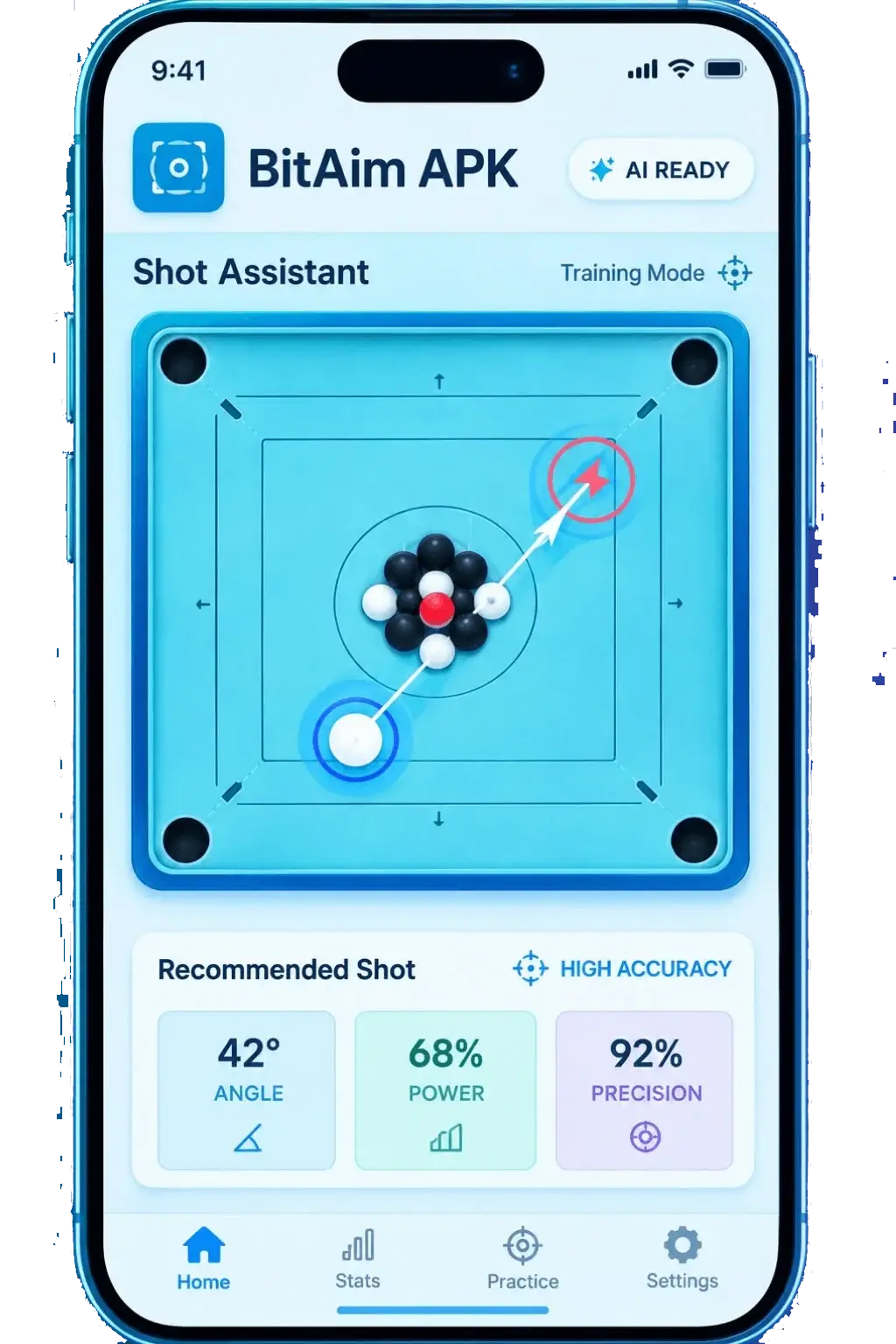
Calculating a 42° or 68° angle manually is tough during high-speed games. The app calculates exact angles in a fraction of a second.
Shot Path Prediction
You can see the route of the strike before you pull back your striker. This shot path prediction ensures you see where every coin goes.
[ Striker Baseline ] ---> ( Calculated Angle Line ) ---> [ Target Coin ] ---> [ Target Pocket ]
Target Coin Identification
The app scans the board and highlights easy targets versus risky placements. This guides your target coin selection effectively.
Pocket Direction Analysis
BitAim analyzes pocket locations relative to your target coin. It shows you the cleanest path toward any of the four corner pockets.
Multiple Shot Suggestions
You do not get just one option. BitAim Plus APK provides multiple shot suggestions. You can choose a safe play or go for a aggressive bank shot.
Visual Board Analysis
The visual board analysis engine handles lighting, board colors, and coin clusters smoothly. It provides clear visual cues on your display.
Shot Precision and Power Control
Hitting the coin at the right angle is only half the battle. BitAim includes power control suggestions so you apply the suitable force to each shot.
Real-Time Gameplay Analysis
The app operates smoothly in the background. It updates line projections instantly whenever coins move across the board.
Simple User Interface
The developers created a clean, easy-to-use interface. You can access all AI assistance options without navigating confusing sub-menus.
How to Download and Install BitAim APK on Android
Downloading and setting up BitAim on your phone is quick and simple. Follow this step-by-step guide to get started.
[ Download APK from BitAimapk.site ]
                 │
                 ▼
[ Enable "Unknown Sources" in Settings ]
                 │
                 ▼
[ Open Downloaded File & Tap Install ]
                 │
                 ▼
[ Launch BitAim & Grant Permissions ]
1. Check Download Requirements
Make sure your phone runs Android 7.0 or higher. You also need around 50 MB of free storage space for a smooth installation.
2. Enable APK Installation on Android
Open your phone Settings. Go to Security or Privacy. Turn on the option to allow installation from Unknown Sources. If you use Google Chrome, allow Chrome to install unknown apps when prompted.
3. Download the BitAim APK File
Open Google Chrome on your device. Go to the official website. Tap the download link or download button to save the official APK file to your device.
4. Install BitAim APK Step by Step
Open your device File Manager. Locate the downloaded BitAim APK file in your Downloads folder. Tap the file and select the Install button. Wait a few seconds for the process to complete.
5. Open and Set Up the App
Launch BitAim from your home screen. Grant the necessary permissions, such as display overlay and screen capture options, so the AI tool functions properly over your carrom game screen.
6. Troubleshoot Installation Problems
If the app fails to install, check your device storage. Also, ensure you do not have an older conflicting version installed. Disabling Play Protect temporarily can resolve false security alerts.
How to Use the BitAim App for Shot Precision
Step 1: Open BitAim & Grant Display Overlay Permissions
Step 2: Launch Your Preferred Digital Carrom Game
Step 3: Align the On-Screen Board Frames
Step 4: Select Your Target Coin & Review Calculated Angle Lines
Step 5: Adjust Your Striker, Select Hit Power, and Take the Shot
- Setting Up the Carrom Board View: Open BitAim first, then start your favorite carrom game. Align the app virtual guidelines with the physical borders of your digital board.
- Analyzing Coin and Striker Positions: Let the app detect your current board state. It will recognize your striker baseline along with all surrounding carrom coins.
- Selecting a Target Coin: Tap or highlight the coin you want to pot. The app highlights available angles toward nearby pockets instantly.
- Understanding Suggested Shot Angles: Look at the projected trajectory lines. The primary line shows your striker path, while the secondary line shows the coin movement.
- Following Shot Guidance: Drag your striker on the screen to match the calculated line angle precisely before releasing your shot.
- Practicing Different Shot Strategies: Use the BitAim Training Mode to practice indirect bank shots, rebound shots, and double-coin hits until you master the motion.
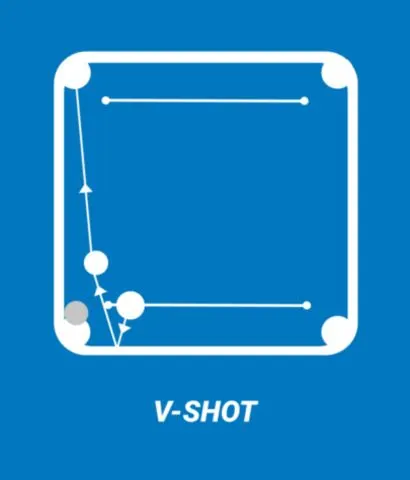
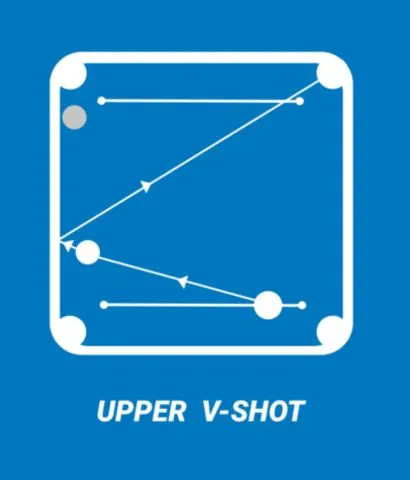
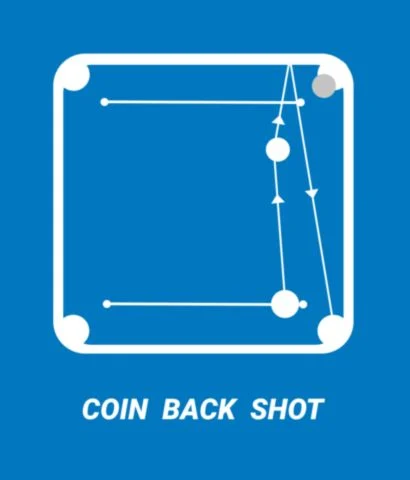
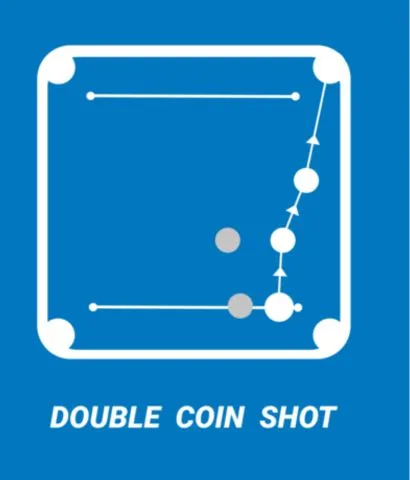
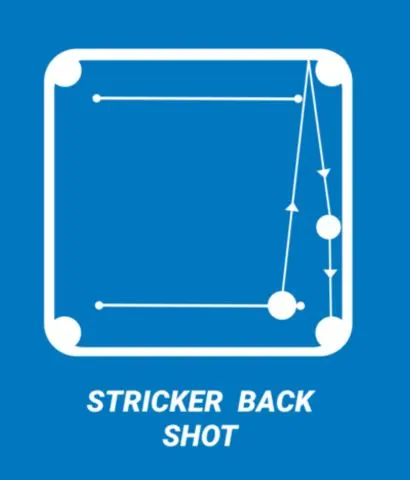
BitAim+ Shots
List of some best shots you can learn using bitAIM+.

BitAim APK Compatibility With Different Devices
BitAim for Android Phones
The bit aim app is fully optimized for Android mobile devices. It works smoothly across Samsung, Xiaomi, Realme, Vivo, OPPO, and OnePlus smartphones.
BitAim on Android Tablets
Using BitAim on a tablet gives you a larger display. This bigger view makes angle lines easier to read and offers even better precision practice.
BitAim for Android TV
While BitAim installs on Android TV platforms, touch-based aiming controls make it far better suited for touchscreen mobile devices.
BitAim for PC Using an Android Emulator
You can run BitAim on Windows PCs. Install a reliable Android emulator like BlueStacks or LDPlayer. Download the APK file from BitAimapk.site into the emulator and launch it alongside your PC carrom game.
BitAim for iPhone and iPad
Currently, there is no native BitAim app download for iOS devices on the Apple App Store. Apple tight security rules restrict overlay assistants. iOS users must run Android emulators on a computer to experience BitAim.
BitAim App Interface and Navigation
- Main Dashboard: The central hub where you toggle AI features, select game modes, and check app settings.
- Shot Selection Screen: Allows you to filter between direct shots, indirect shots, and complex bounce shots.
- AI Assistance Controls: Simple toggle buttons to turn line extensions, angle degrees, and power indicators on or off.
- Understanding Shot Suggestions: Colored lines guide your play. For instance, green lines indicate direct paths, while yellow lines show bank shots.
Benefits of Using BitAim for Carrom Practice
- Learning Shot Angles: You visually grasp geometry on the board, helping you understand rebound principles faster.
- Improving Board Awareness: You learn to see the entire board layout instead of focusing only on easy, direct targets.
- Understanding Coin Positioning: The app teaches you how moving one coin changes the entire board state for future turns.
- Developing Shot Planning Skills: You learn to plan two or three moves ahead, building professional player habits.
- Practicing Different Carrom Strategies: You can test risky indirect shots without fear during practice sessions.
BitAim APK Accuracy and Performance
How Accurate Is Its Shot Prediction?
BitAim offers an impressive accuracy rate of up to 92% for power estimation and 68% to 90% for complex angle support. It calculates exact trajectories in seconds when your screen alignment is spot-on.
[ BitAim Accuracy Performance ]
Shot Angle Calculation : ████████░░ 80% - 90%
Power Recommendation   : █████████░ 92%
Visual Detection Speed : ██████████ 99%
Factors That Affect AI Detection
- Lighting and Camera Position: Poor screen brightness or custom display filters can confuse coin color detection.
- Board Visibility and Image Quality: Custom board skins or highly decorated carrom boards may interfere with automatic line alignment.
- Common Shot Prediction Limitations: The AI relies on standard physics engines. Extreme game-specific physics glitches can occasionally alter outcomes.
BitAim APK Pros and Cons
Advantages of BitAim
- Provides real-time visual assistance and precise line extensions.
- Simplifies complex indirect bank shots for beginner players.
- Light file size that runs smoothly on low-end devices.
- Clean and user-friendly interface with zero intrusive setup.
- Free to download and test from BitAimapk.site.
Limitations of BitAim
- Not available natively on iOS devices (iPhones/iPads).
- Requires precise initial overlay alignment to maintain shot accuracy.
- Over-reliance on AI can slow down your natural intuition if used continuously.
BitAim APK Safety, Privacy, and Permissions
Is BitAim APK Safe to Install?
Yes, the file is safe when you download it from trustworthy developers and official mirrors like BitAimapk.site.
Risks of Downloading APK Files From Unofficial Sources
Downloading files from unverified third-party sources can expose your device to modified files, malware, or unwanted pop-ups. Always stick to verified file sources.
Checking App Permissions
BitAim only requires display overlay permissions (to draw lines over your game) and screen access (to analyze board arrangements). It does not ask for personal contacts, SMS access, or storage files.
How to Scan an APK Before Installation
You can upload any downloaded APK file to VirusTotal before hitting the install button. This quick security check gives you complete peace of mind.
BitAim APK vs Other Carrom Assistant Apps
| Feature | BitAim APK | Manual Calculation | BitAim Lulubox / LuluOx | Traditional Practice |
| Real-Time AI Guidance | Yes | No | Partial | No |
| Indirect Shot Support | High Accuracy | Difficult | Basic | Skill Based |
| Line Length Extension | Unlimited / Long | Mental Only | Short Lines | None |
| Ease of Use | Very Easy | Hard | Medium | Hard |
| Device Load | Very Low | None | Medium | None |
Common BitAim APK Problems and Solutions
BitAim APK Not Installing
Ensure your Android system version is 7.0 or higher. Clear cached data, check your storage space, and verify that installation from unknown sources is turned on in your settings.
App Not Opening or Crashing
Restart your device and clear the app cache memory under settings. Make sure you are using the latest version updated at BitAimapk.site.
Camera or Image Detection Not Working
Re-align the app screen frame with your carrom board borders. Ensure your device screen brightness is turned up and custom night-light color filters are turned off.
Incorrect Shot Angles
Reset the screen calibration overlay inside the app menu. Double-check that your game board view is not zoomed in or tilted away from the center position.
Slow AI Processing
Close memory-heavy apps running in your background. BitAim relies on free RAM memory to calculate trajectory lines smoothly.
BitAim APK Updates and New Features
Updating to the latest version guarantees access to updated board geometry algorithms, smoother line rendering, and faster processing speeds. Check BitAimapk.site regularly to get new releases.
[ Visit BitAimapk.site ] ➔ [ Download Latest APK ] ➔ [ Install Over Current Version ]
When you update, you keep your saved settings intact while unlocking better accuracy, improved compatibility with new game updates, and cleaner performance.
Responsible Use of BitAim in Online Carrom
BitAim is built as a training companion and digital learning utility. It helps you understand angles, refine hit force, and build game awareness.
While practicing with AI tools builds your personal skills quickly, always respect competitive online game rules and fair play policies when participating in official tournaments or live multiplayer games. Use it as a digital learning tool to turn yourself into a professional carrom player.
Frequently Asked Questions About BitAim APK
What Is BitAim APK Used For?
It is an AI-powered shot assistant designed to help carrom players learn shot angles, target directions, and force estimation.
Is BitAim APK Free to Download?
Yes, you can download the base app for free at BitAimapk.site.
What Is the Latest Version of BitAim?
The current release is version 10.7.3, optimized for better image processing speed and updated board support.
Is BitAim Available for Android?
Yes, it is designed specifically for Android mobile devices running version 7.0 or higher.
Can I Download BitAim on iOS?
No, BitAim is not available natively on iOS devices due to system overlay restrictions on iPhones and iPads.
Can I Use BitAim on a PC?
Yes, you can run the APK file on a Windows PC using a reliable Android emulator like BlueStacks.
Does BitAim Work With Every Carrom Game?
It works with almost all major digital carrom games including Carrom Disc Pool and CCA Carrom setups.
Does BitAim Require an Internet Connection?
You need an active internet connection to download the app and fetch initial processing updates, but offline practice features are supported.
How Does BitAim Calculate Shot Angles?
It uses visual AI technology to analyze screen frames, mapping the exact geometric lines between your striker, the target coin, and the pockets.
Is BitAim Safe to Install?
Yes, downloading the official file from BitAimapk.site ensures a safe, clean installation experience.
Why Is BitAim Not Working on My Phone?
Ensure you have granted display overlay permissions and that your phone runs Android 7.0 or higher.
Can BitAim Guarantee Successful Shots?
The app provides highly accurate line suggestions, but you still need to pull back your striker with the correct speed and timing.
Conclusion
If you want to master indirect bank shots and improve your board awareness, BitAim APK is a solid choices for your phone. It turns complex geometric math into clean visual lines on your display screen.
Download the latest version today at BitAimapk.site, open up your practice board, and start landing your best shots with confidence!